
Stay updated everywhere, anytime with Bangkok Post digital products
-
Bangkok Post on smart television
In this digital age, convenience is essential. For digital savvy people, like you, who has multiple digital devices at your disposal it is important to be able to easily access news and content via various channels and applications that fits your lifestyle.
And, for your convenience, Bangkok Post provides many options for you to do so, as follow...
-

Mobile phones
Because mobile phones has slower data transfer speed then PCs, you can use our m.bangkokpost.com for faster mobile web surfing experience.
-

Tablets
Apple iPad, BlackBerry Playbook and Android tablets can get news via our tablet apps
-

Smart TV
Have you got a Samsung smart TV, try our latest smart TV application out
-

Archive
Looking for content which are older than 60 days? Use this service
-

E-newsletters
If you are the kind that loves to have news delivered straight to your inbox, this is the service for you
-

RSS
We also provide real-time news feed via RSS feeds, which pushes content to your RSS reader as soon as new content emerges
-

Facebook
If you perfer to have prominent news and content selected for you to see regularly, become our fan
-

Twitter
Breaking news lovers better follow us on Twitter and get constant updates around-the-clock
-
-
Bangkok Post on feature & smart phones
Bangkok Post has many applications and services for your mobile phone, as follow...
-

SMS news service
Delivering latest up-to-minute news throughout the day, 7 days a week via your mobile phone. More information.


-

Mobile device friendly website at m.bangkokpost.com
Because mobile phones has slower data transfer speed then PCs, you can use our m.bangkokpost.com for faster mobile web surfing experience.
-

Smartphone applications
Our mobile applications give you Thailand's latest top stories, op-ed articles and plenty of other information, all for free.
Download iPhone application Download Andriod application Download Blackberry PlayBook application


-

E-paper on mobile phones
For real printed newspaper experience on your mobile phone, try our e-paper service. It will give you the exact look and feel like our printed paper, plus extra cool features. More subscription and registration at https://www.bangkokpost.com/epaper.
Download iPhone application Download Android application

-
-
Bangkok Post on tablet devices
Bangkok Post has many applications and services for your tablet device, as follow...
-

Tablet application
Our application gives you Thailand's latest top stories, op-ed articles, horoscope, multimedia and plenty of other information, for free.
Download iPad application Download Andriod application Download Blackberry PlayBook application
-

E-paper on tablet devices
For real printed newspaper experience on your tablet device, try our e-paper service. It will give you the exact look and feel like our printed paper, plus extra cool features.
Download iPad application Download Android application
-

Thaipad digital magazine
Thailand's first interactive English-language digital monthly news magazine. Thaipad takes readers beyond the boundaries of traditional magazine journalism. For more information go to http://www.thaipadmag.com.
-
-

Bangkok Post on smart television
Have you got a Samsung smart TV, try out our latest smart TV application, which provides you with latest news, top stories, business news, op-ed pieces and much more.

-

Get relevant news conveniently delivered to your inbox
Did you know, as a Bangkokpost.com member, you can choose to get e-newsletters sent straight to your e-mail account regularly?
Bangkokpost.com provides e-newsletters and e-mail alerts for various kinds of content as follow...
-
- •
Top stories of the day
- •
All recent news around the clock
- •
Thailand general news
- •
Updates on Thailand's restaurants, entertainment places and local destinations
- •
Opinion and analysis pieces by renowned Bangkok Post columnists
- •
Thailand business news
- •
-
- •
Technology, gadget, games and application update
- •
Features and tidbits on how go on trips in Thailand
- •
Tips and courses to improve your English skills
- •
Car reviews and previews
- •
Lifestyle improvement & fashion updates
- •
Bangkokpost.com members can set their e-mail alert preferences to get some or all the above e-newsletter by...
Already a member? Log in and get them now!
Not a member yet? Simply complete your registration at this link, then go to your alert settings page and choose the ones you'd like to get.
-
-
RSS can get your news delivered and organised
List of RSS feed we provide Most recent https://www.bangkokpost.com/rss/data/most-recent.xml Top stories https://www.bangkokpost.com/rss/data/topstories.xml Thailand channel articles https://www.bangkokpost.com/rss/data/thailand.xml World channel articles https://www.bangkokpost.com/rss/data/world.xml Business channel articles https://www.bangkokpost.com/rss/data/business.xml Opinion channel articles https://www.bangkokpost.com/rss/data/opinion.xml Sports channel articles https://www.bangkokpost.com/rss/data/sports.xml Life channel articles https://www.bangkokpost.com/rss/data/life.xml Learning channel articles https://www.bangkokpost.com/rss/data/learning.xml Video channel articles https://www.bangkokpost.com/rss/data/video.xml Property channel articles https://www.bangkokpost.com/rss/data/property.xml Photos channel articles https://www.bangkokpost.com/rss/data/photos.xml You may recently have heard or seen of something called RSS, or noticed little orange buttons around the websites that mention RSS, syndication, Atom feeds and the like. Since BangkokPost.com has recently begun adding RSS feeds to their service, here is some background, and ideas on how to make it work for you.
RSS is a "feed" or a broadcast sent to you, and routed to your RSS"reader," the software or website you use to browse the news, views, reviews and opinions you choose to have sent to you.
This is not email; you must choose the sites you want to read and physically subscribe to. It is not spam; you can unsubscribe or end the feed at single mouse click.
But it also isn't browsing. Web pages come to you, instead of you going to them. They arrive in summary form, and you look at them when it pleases you - instantly, or an hour or a few days later.
Here is the example:
You go to BangkokPost.com (who doesn't?). At the top right hand corner of the front page is the website's Breaking News, where the Bangkok Post Digital staff put the early news, before the newspaper can print it and deliver it to your door.
At the very bottom, right-hand corner of this tasteful Breaking News box is a small, orange button that says "RSS". Once you install an RSS reader of some sort on your computer, you may be able to click that button and subscribe. Most likely, however, you must do this:
Right click the RSS button. Scroll down and click Copy Shortcut. Go to your RSS software (please be patient, it won't be long) and find where you Open or Add an RSS feed.
Once you do that, you no longer have to visit BangkokPost.com to check on Breaking News. It arrives regularly - how regularly is up to you. Your RSS reader will have all the headlines and the first paragraphs of each story. If you want more, just click, and the full story opens up, from the website, just as if you had gone there yourself.
BangkokPost.com also offers the Top Stories of the day - the most important headlines - as an RSS feed, and these also will be updated and shown to you automatically.
The reason for RSS is simple: It's win-win. You get brief summaries of all websites and stories you want without waiting minutes or hours for those websites to load - only to learn there's nothing interesting there. The websites get more visits from you (through the RSS software) because you have more time to click only on what is interesting, rather than wandering the web more aimlessly.
Put another way, BangkokPost.com has 20 to 30 Breaking News stories daily, but only shows 10 at a time on the web page. With RSS, you have them all.
You can get RSS on the web. The site du jour is Bloglines.com, a well-organised site. Here, you log onto one website, and all the other websites you like come to you - blogs, news, technology developments, movie reviews - whatever you like.
I like this to happen on my own computer on my own desktop, so that I have the links and stories available even if the Internet isn't working. I had almost settled on a reader when a strange thing happened: Its website disappeared.
SharpReader is an older program (as RSS goes), and does everything I want. Subscriptions are so easy to be almost automatic, and updates are shown as they arrive, for three seconds in a pop-up box on my screen, alerting me to new news without getting in my face.
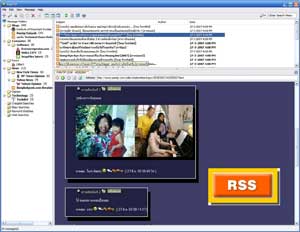
Snarfer, a fairly new RSS reader, reads Thai very well, as well as English, and lets you subscribe even to web chats. You generally subscribe to RSS feeds by clicking or copying orange-coloured buttons like the one that has been enlarged for this example. Just as I started to write this review, the website ownership expired - I suppose; hijacking is not unknown on the web - and then suddenly appeared again the day this column went to pre-press.
If you want quite an excellent, small and terrifically fast reader, you'll give this fairly small (800KB full download) SharpReader a test.
By the way, SharpReader and many of the newer RSS readers require Microsoft .Net Framework, which has three versions. If you have an older or non-updated Windows, you may have to get this entirely free but huge software set from Microsoft here: tinyurl.com/kcvy
Snarfer is the program I finally settled on. It's one of the newest, one of the smallest and suits my needs very well because it's fast.
Geeks who really like to play with options may find Snarfer a little restrictive. If you want your unread headlines from East Asia to be yellow on purple, while those from Europe should be blue on red, you have the wrong program.
Snarfer is well named (snarf: to nick, swipe, abstract) and well suited to quick, structured presentation of headlines and summaries of news, views and reviews. I can't see how adding (or dropping) an RSS feed could be easier. Even better, Snarfer can import and export lists of feeds, including to RSS-reader websites such as Bloglines.
SharpReader is at www.sharpreader.net
See Snarfer run at www.snarfware.com
Email: wandas@post.com
-

Today, you can follow our news right in to your Twitter account. There are various types of news from our printed newspaper headlines, editors' blogs, breaking news, up-to-date world news. Don't forget to visit our twitter page and follow our news to keep yourselves updated.

News Tweets Related Links 
Breaking news
twitter.com/bangkokpostnewsBangkok Post Facebook fansite
Bangkok Post news RSS feed
Bangkok Post mobile phone SMS news
Bangkok Post e-paper

Bangkok post culture
twitter.com/BPculture
World
twitter.com/BPworldnewsFor more information, call 02-414-4000 ext. 1916 or webmaster@bangkokpost.co.th